Arch Linux ARM image for Zipit Z2
2012-09-12 20:30
Quite some time ago, I have written a blog entry about
how to install
Arch Linux on the Zipit Z2, but I did not provide an image back then.
Now I have prepared a ready-to-use image of
Arch Linux ARM for the Z2.
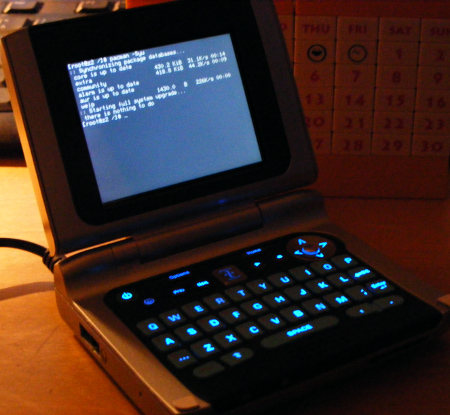
It is based on official up-to-date packages. Only for the kernel I had to build one compatible with the Z2.
I have chosen the 3.6.0-rc3 vanilla kernel (
config).
I have pre-configured zram for use as swap. zram allows portions of a computer's RAM to be used as a block device. This alone would not be of much use, but zram compresses the data of the block device in RAM, so when using a zram block device as a swap device the total amount of available memory increases. This is essential on the Z2 as the device's 32 MB of RAM alone are not enough for pacman and some other programs.
With zram swap pacman runs fine most of the time. One could also use the SD card for swapping, but I do not recommend that as swapping to SD card is very slow and also reduces the card's lifespan considerably.
I have also included my own little repository in pacman's config file, so in case I update the kernel or prepare some other packages for the Z2
not found in the main repositories, you can still easily install/update those through pacman.
You need a Zipit with the U-Boot bootloader installed to use this image.
Installation of the image is pretty simple. All you need is some kind of Linux computer to prepare an SD card with the ext2 file system, then
extract the archive onto that SD card. A SD card with 1 or 2 GB is fine.
Larger cards are okay too, if U-Boot recognizes them correctly.
The system comes with only one user: root. The password for root is 'root'.
You should probably change that. Also, you should create a non-priviledged user with
useradd.
To connect to a wireless network, you can use
wifi-menu and
netcfg-menu.
To select a wireless network from the available networks run:
# ifconfig wlan0 up
# wifi-menu
To later connect to a previously configured one run:
# netcfg-menu
archlinuxarm-zipit-z2-wej-20120912.tar.xz
Size: 105 MB, md5sum: 3448e0ee37e38a6e3bbef7685fe87f2e
If you want to try this image, but are not familiar with Arch Linux, I recommend having a look at the official
ArchWiki.
2012-09-13 08:37:28
Great, thank you!
Perfect for lazy guys like me ;-)
Will try it ASAP.
What paches did you use for the kernel?
Do you provide a PKGBUILD?
2012-09-13 08:58:34
I did not patch the kernel. There is support for the Z2 in the mainline kernel. :)
You can find the PKGBUILD here: http://wejp.k.vu/arch/pkgbuilds/linux-z2/PKGBUILD.txt
Beware though, that it does the actual packaging only, as it is much faster to cross-compile the kernel. Of course you can easily add the actual compilation steps to the PKGBUILD if you really want to.
2012-11-22 18:58:06
I've been playing with this since I'm in love with Archlinux in general. However, when using the image you've provided and trying to update the system with pacman glibc decides it hates the world and refuses to install. I've tried following some of the guides on properly updating glibc, but, nothing seems to go, any suggestions or help on getting this to go through properly? Thanks!
2012-11-23 14:38:20
nanenj: Could you be a little more specific, what exactly happens when you try to update glibc?
2012-11-30 14:21:37
:O I love you. This is amazing and I'm glad to see support continuing for the z2.
2012-12-03 16:02:18
Unfortunately I've migrated away from arch at the moment, I'll see if I can fiddle around and get arch back on, but, it's basically the problem discussed here: https://wiki.archlinux.org/index.php/DeveloperWiki%3Ausrlib
Unfortunately, even when following the instructions there it doesn't seem to work, every time I've tried so far it's resulted in a non-working system after reboot. I'm quite aware I must be doing something wrong, but, not sure what.
2012-12-04 15:38:15
nanenj: What I have done in that situation was roughly the following:
1) Install busybox and start a busybox shell. This is important because your usual shell and tools depend on a working libc each time they are invoked, which will break as soon as you delete/rename the old /lib directory.
2) Run pacman -Syu --ignore glibc
3) Manually extract the latest glibc package in your root directory (glibc's files should be placed under /usr/lib).
4) Move the old /lib folder to something like /lib-old
5) Create the /lib symlink to /usr/lib
6) Correctly install the glibc package with pacman -Sf
At this point your system should be in a working and consistent state again.
2013-08-07 09:45:16
Cool, thanks!
Here is an up-to-date image: http://dukzcry.cc/hlam/archlinuxarm-zipit-z2-20130807.tar.xz
What i've done for updating is the following:
On host machine, after unpacking wej's image
cp -ur bin/* usr/bin/; cp -ur sbin/* usr/bin/; cp -ur usr/sbin/* usr/bin; rm -rf bin sbin usr/sbin; ln -s /usr/bin bin sbin usr/sbin
(see https://www.archlinux.org/news/binaries-move-to-usrbin-requiring-update-intervention/)
After loading a Zipit
pacman -Syy; pacman -S --force glibc; pacman -S --force pacman
pacman -Su
2013-08-08 05:20:55
wej,
I'm getting "Failed to set vcc_core" when trying upscale the freq with your image. I didn't get this issue with mozzwald's zram or openwrt-zipit kernels.
2013-08-09 17:24:20
dukzcry: Looks like it is a kernel issue or a kernel configuration issue. There is nothing wrong with using mozzwald's kernel with the Arch image though, so if that works okay, you can stick with that kernel.
Oh, and thanks for your updated image!
2013-09-26 04:59:47
dukzcry: you may try the 3.6.0 build from anarsoul: https://www.dropbox.com/s/ye333qi8sq9m2lr/zipit-3.6-2013-09-25.tar.gz
2013-11-17 06:13:28
I have done the USB mod to the zipit, but Arch doesn't even seem to realize that there is USB support at all. I am using dukzcry's fixed image.
2013-11-17 08:23:23
pcbmaster: If USB host is not working, it is most likely a kernel issue. The Arch userland should not cause any problems with USB as long as the kernel has USB host support built-in. You could try to build your own kernel with USB host support enabled. As a starting point for building your own kernel you can use the kernel config of the running kernel. It can be found under /proc/config.gz.
2013-11-17 17:34:12
wej: How would I go about doing that? Or how could I use anarsoul's 3.6.0 build that is linked above?
2013-11-17 19:57:55
For building your own kernel you should at least be somewhat familiar with building a Linux kernel in general. Then you need an ARMv5 cross compiler, which you would then need to compile the kernel for the target device.
On the other hand, if you've already got a compiled kernel, that kernel typically consists of two parts: The actual kernel binary (called uImage in case of the Z2) and (optionally) several kernel modules (.ko or .ko.gz files). The kernel image needs to be placed in a certain location on the SD card for the bootloader to find it, which is the /boot directory. The modules for that kernel need to be placed under /lib/modules/KERNELVERSION/ . If someone has packaged a prebuilt kernel in a tar archive, it probably creates those files in the right ocations when extracted to the SD card's root directory.
2013-12-10 18:17:05
For heavy Linux distros (ALARM is heavy for a device with 32 Mb of RAM) one may also need to have the following script: "dd if=/dev/zero of=/tmp/swapfile1 bs=1048576; count=<SWAP SIZE IN MBYTES>; mkswap /tmp/swapfile1; chown root:root /tmp/swapfile1; chmod 0600 /tmp/swapfile1; swapoff /dev/zram0; swapon /tmp/swapfile1" and run it whenever pacman or other process runs out of ram (even zram is not a cure-all here).
2014-05-23 16:12:09
I ran mkfs.ext2 on the Zipit, extracted the tarball as root onto the SD card, and the Zipit booted into recovery. I tried extracting the 3.0.0 z2kernel (http://mozzwald.com/z2kernel) onto the SD card and tried again, and it still booted into recovery. Am I missing a step somewhere?
I'd really like to get this working (I love Arch!), so any help is appreciated.
2014-05-23 17:05:30
Update: Got it! The solution for me was to run fdisk and mkfs.ext2 on the Zipit, not on the PC. The Zipit wasn't able to read the partition table created by the (Linux Mint 13) PC (perhaps different driver versions?).
(on the zipit)
$ fdisk /dev/mmcblk0
o (overwrite partition table)
n (add new partition)
p (primary partition)
1 (first primary partition)
<enter> (default first sector)
<enter> (default last sector)
w (write partition table to media)
q (quit fdisk)
$ mkfs.ext2 /dev/mmcblk0p1 #Important: Note the 'p1'!
$ sync ; poweroff
(on the PC)
$ mount /dev/mmcblk0p1 /mnt #Your device naming may vary.
$ cd /mnt
$ sudo tar -x -v -f /path/to/archlinuxarm-image.tar.xz #Must be extracted as root!
$ sync ; umount /mnt
Pop it in the zipit and watch it boot. This all comes after U-boot / Flashstock of course.